


Table of Contents
Introduction
Why Every Beginner Freelancer Needs a Portfolio Website in 2026
One of the biggest misconceptions in freelancing is believing that clients only hire people with years of experience. In reality, most clients simply want evidence that you can solve their problem. That evidence does not always come from previous jobs—it comes from your portfolio.
If you are learning how to build a simple freelance portfolio website with no code, you already have an advantage over many beginners who rely only on freelance marketplace profiles. A personal portfolio website gives you complete control over how you present your skills, your work, and your professional identity.
If you're starting from scratch, first read our complete guide on how to start freelancing with no experience, which explains how choosing a skill and building a portfolio fit into your overall freelancing journey.
Think of it as your online office. Instead of sending potential clients to a crowded marketplace where they are surrounded by thousands of competitors, you invite them into a space that belongs entirely to you.
The best part?
You no longer need programming knowledge or expensive web developers to create one. Modern no-code tools make it possible for anyone to build a clean, professional portfolio website within a few hours.
In fact, many successful freelancers begin with a simple one-page portfolio website and improve it over time as they gain more experience and client work.
Whether you want to become a content writer, virtual assistant, graphic designer, social media manager, or web developer, this guide will show you exactly how to create a portfolio website that builds trust and helps you win more freelance clients.
Why a Portfolio Website Matters More Than a Resume
Many beginners spend days creating the perfect resume.
Unfortunately, resumes rarely convince freelance clients.
Freelancing is different from traditional employment. Companies hire employees based on qualifications, while freelance clients hire people based on proof.
A portfolio demonstrates your ability instead of simply claiming it. Learning how to build a simple freelance portfolio website with no code allows beginners to demonstrate their skills professionally without needing expensive web developers or technical expertise.
Imagine two beginner writers applying for the same project.
Applicant A
“I have excellent writing skills.”
Applicant B
“Here are three articles I recently wrote, along with a website where you can review my work.”
Which applicant immediately appears more trustworthy?
Exactly.
Even without paid experience, a portfolio gives potential clients confidence because they can evaluate your work themselves.
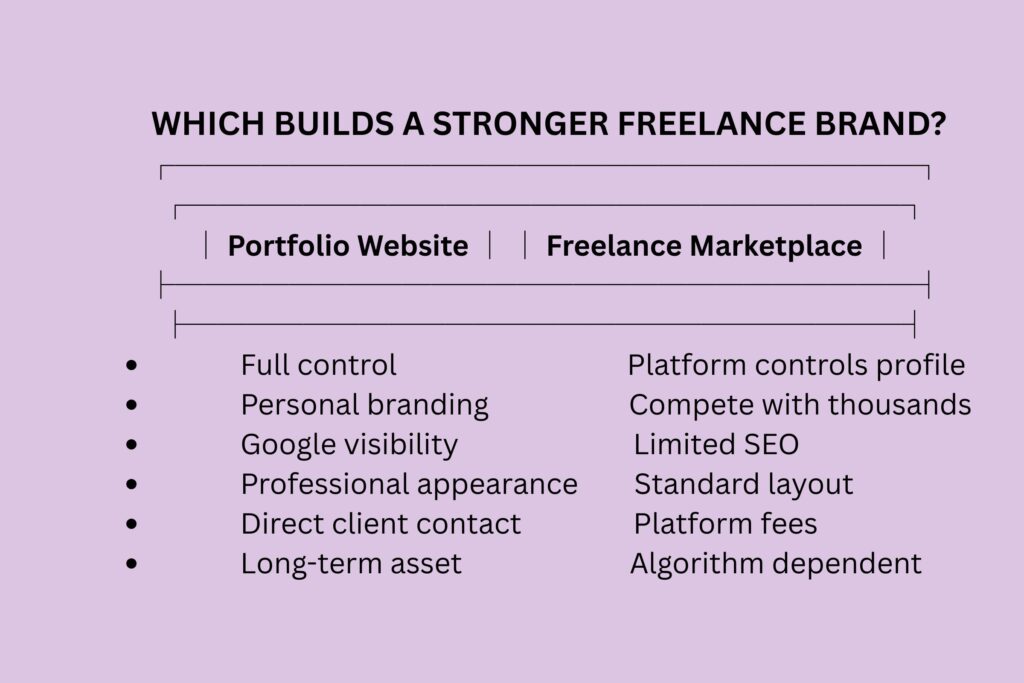
Portfolio Website vs Freelance Marketplace Profile
| Portfolio Website | Freelance Marketplace Profile |
| You control everything | Platform controls layout |
| Builds long-term personal brand | Promotes the platform first |
| Helps clients find you on Google | Limited Google visibility |
| Looks more professional | Similar to thousands of competitors |
| Can grow into a business website | Limited customization |
If you're unsure which marketplace is the right starting point, read our detailed guide on the best freelancing platforms for beginners in 2026, where we compare popular platforms based on beginner-friendliness, competition, fees, and earning potential.
This does not mean you should avoid freelance platforms.
Instead, use both together. Think of freelance platforms as places where clients discover you, while your portfolio website is where they decide whether to trust you.
A freelance platform helps you secure your first projects, while your portfolio website strengthens your personal brand and makes you look more established.
Can You Build a Professional Portfolio Website Without Coding?
Absolutely.
Ten years ago, creating a website usually required hiring a developer or learning HTML, CSS, and JavaScript.
Today, things are completely different.
No-code website builders allow beginners to create attractive websites using simple drag-and-drop editors.
You can add pages, upload images, write service descriptions, and even create contact forms without touching a single line of code.
Your clients will never know whether your website was built by a professional developer or by you.
What they will notice is how clearly your website explains:
- What you do
- Who you help
- Why they should trust you
- How they can contact you
That is far more important than the technology behind the website.
What Every Freelance Portfolio Website Should Include
Many beginners make the mistake of filling their websites with unnecessary information.
Clients are usually looking for answers to five simple questions.
1. Who Are You?
Write a short introduction explaining:
- Your name
- Your freelance service
- The type of clients you help
Avoid writing your entire life story.
One concise paragraph is enough.
2. What Services Do You Offer?
Instead of writing:
“I can do almost anything.”
Be specific.
Example:
- SEO Blog Writing
- Product Descriptions
- WordPress Content Uploading
- Email Copywriting
Specific services attract better clients.
3. Show Your Best Work
This is the heart of your portfolio.
Even if you have never worked with a real client, you can still include:
- Sample blog posts
- Practice projects
- Mock websites
- Social media graphics
- Logo concepts
- Case studies
- Personal projects
Clients care more about quality than whether someone paid you to create it.
If you're worried that you don't have any client work to showcase, don't let that stop you. Our complete guide on how to build a freelance portfolio with no experience explains how to create impressive portfolio samples that demonstrate your skills, even if you've never worked with a paying client.
4. Add Client Testimonials (When Available)
If you are completely new, skip this section.
Never create fake testimonials.
Instead, once you complete your first few projects, politely ask satisfied clients for short feedback that you can display on your website.
Authentic testimonials are one of the strongest trust signals you can build.
5. Make Contact Easy
Surprisingly, many freelancers hide their contact information.
Do the opposite.
Include:
- Contact form
- Professional email
- LinkedIn profile
- Freelance platform profile
- Business social media (if relevant)
The easier you make it for someone to contact you, the more likely they are to do so.
Case Study: How a Beginner Writer Won Her First Client
Sarah wanted to become a freelance content writer.
She had never worked with a paying client and believed nobody would hire her because she lacked experience.
Instead of waiting for opportunities, she created three sample articles in industries she wanted to write about.
She then built a simple one-page portfolio website using a no-code website builder.
When applying for freelance jobs, Sarah stopped saying:
“I can write blogs.”
Instead, she shared a link to her portfolio.
Potential clients could immediately read her writing style, understand her structure, and evaluate her quality.
Within three weeks, one small business owner hired her to write four blog posts.
Her portfolio—not previous experience—gave the client confidence to trust her.
Lesson:
Key takeaway: Sarah didn’t win her first client because she had years of experience. She won because her portfolio gave the client enough confidence to believe she could deliver quality work. A simple website often creates that confidence faster than a résumé ever can.
Choosing the Right No-Code Website Builder
The first decision you need to make when learning how to build a simple freelance portfolio website with no code is choosing the right platform. Fortunately, you do not need expensive software or advanced technical skills to create a professional-looking website.
Different website builders are designed for different needs. Some focus on simplicity, while others provide greater flexibility as your freelance business grows.
The table below compares some of the most popular no-code website builders for beginner freelancers.
| Website Builder | Best For | Free Plan | Ease of Use |
| WordPress.com | Long-term growth and blogging | Yes | Easy |
| Carrd | One-page portfolio websites | Yes | Very Easy |
| Wix | Creative portfolios and visual design | Yes | Easy |
| GitHub Pages | Developers with basic Git knowledge | Yes | Moderate |
For most beginners, WordPress.com offers the best balance between simplicity and future scalability because it allows you to expand your website as your freelance career grows. If you only need a simple one-page portfolio, Carrd is another excellent choice.
Beginners can build professional portfolio websites using free platforms such as WordPress.com, Carrd, or GitHub Pages without learning programming. The platform itself matters far less than presenting your work clearly and making it easy for potential clients to contact you.
Remember, clients rarely choose freelancers because of the platform they use. They choose freelancers because their portfolio clearly demonstrates expertise, professionalism, and trustworthiness.
Step-by-Step Guide to Building Your Portfolio Website
Building your first portfolio website may sound overwhelming, but the process is surprisingly straightforward when broken into manageable steps.
Step 1 – Choose a Clean Template
Avoid complicated layouts filled with animations and unnecessary effects.
Instead, choose a clean, professional design that keeps the focus on your work.
Visitors should immediately understand:
- Who you are
- What services you offer
- How you can help them
- How they can contact you
Simple websites usually outperform cluttered ones because they are easier to navigate and load faster.
Step 2 – Create Your Main Pages
Every beginner portfolio website should include at least these pages:
- Home
- About
- Services
- Portfolio
- Contact
If you plan to publish helpful articles in the future, you can also add a Blog page. Blogging consistently can improve your visibility in search engines while demonstrating your expertise to potential clients.
A well-structured blog also strengthens your simple freelance portfolio website with no code by demonstrating your knowledge, improving SEO, and giving potential clients more reasons to trust your expertise.
Step 3 – Add Your Best Portfolio Samples
Do not upload everything you have ever created.
Instead, showcase three to six of your strongest projects.
Quality always beats quantity.
For each project, explain:
- The problem
- Your solution
- The tools you used
- The outcome
Clients enjoy understanding your thought process rather than simply viewing the finished result.
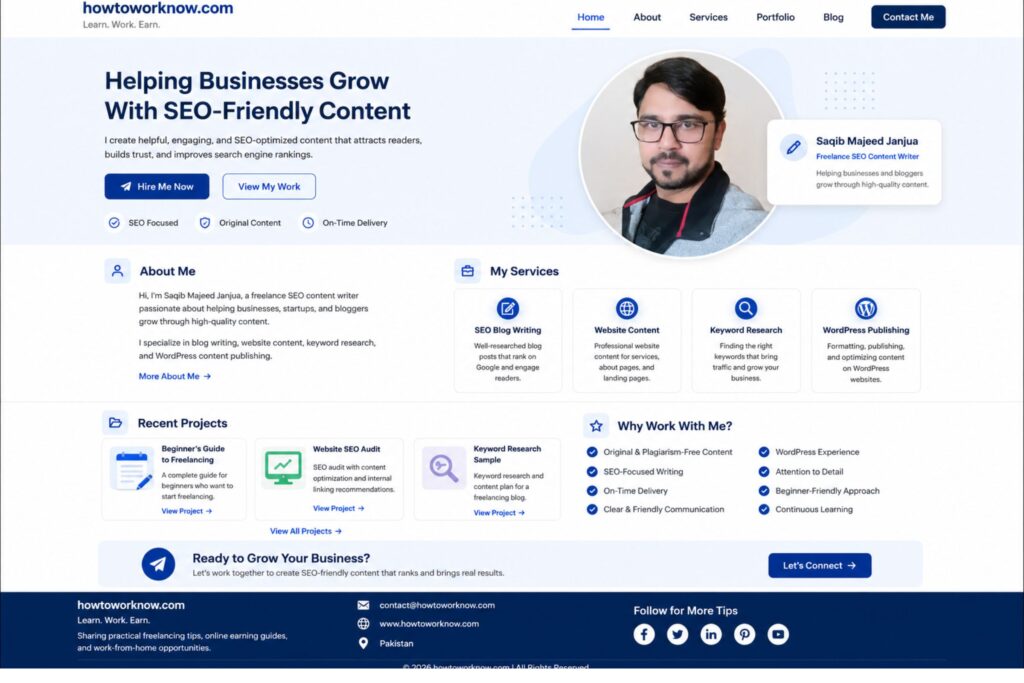
Looking at portfolios on Behance can help you understand how professionals organize projects, present their work, and communicate value to potential clients. Use these examples for inspiration, but always create original portfolio pieces that reflect your own abilities rather than copying someone else’s work.
Step 4 – Write a Professional About Section
Many beginners write their About page like a personal autobiography.
Clients are not looking for your life story.
Instead, answer three simple questions:
- What do you do?
- Who do you help?
- Why should clients trust you?
Keep the tone friendly, confident, and focused on how you solve client problems.
Step 5 – Add a Clear Call-to-Action
Never assume visitors know what to do next.
At the end of every important page, invite them to take action.
Examples include:
- Request a quote
- Send a message
- Schedule a consultation
- View your freelance profile
A clear call-to-action significantly increases the chances that interested visitors will contact you.
Once your portfolio website is complete, the next step is creating a profile that reinforces the same professional image. Read our guide on how to create a freelance profile approved fast to optimize your profile across freelance platforms and build greater trust with potential clients.
Common Mistakes to Avoid When Building a Portfolio Website
Many beginner freelancers unintentionally reduce their chances of getting hired by making avoidable mistakes.
Some of the most common include:
- Using low-quality or unfinished portfolio samples
- Writing long paragraphs instead of concise descriptions
- Adding skills they cannot confidently deliver
- Forgetting to include contact information
- Ignoring mobile responsiveness
- Using poor-quality profile photos
- Copying other freelancers’ portfolio content
A portfolio should make it easy for clients to understand what you do and why they should choose you. If visitors become confused or overwhelmed, they are likely to leave without making contact.
Case Study – How a Simple Portfolio Helped a Virtual Assistant Get Clients
Ali wanted to work as a virtual assistant but had no previous clients or testimonials. Instead of waiting for experience, he created a simple one-page portfolio website showcasing his Google Workspace skills, calendar management, email organization, and sample administrative tasks.
He also included a short introduction explaining how he could help busy business owners save time. After adding the website link to his LinkedIn profile and job applications, one startup founder contacted him for a trial project.
Within six weeks, Ali secured his first long-term virtual assistant client. His experience shows that a clear, professional portfolio often builds trust faster than simply listing skills on a résumé.
Final Checklist Before Publishing Your Portfolio Website
A nice table such as:
| ✔ Check | Completed? |
| About page | □ |
| Services page | □ |
| Portfolio samples | □ |
| Contact page | □ |
| Mobile friendly | □ |
| Grammar checked | □ |
| Links working | □ |
Before publishing, review everything carefully to ensure your simple freelance portfolio website with no code looks professional on both desktop and mobile devices.
Conclusion
A portfolio website is not about showing that you’re already successful. It is about giving clients enough confidence to hire you.
Almost every successful freelancer started with an empty portfolio. The difference is that they built something instead of waiting for experience.
Start with one page, publish your best work, and improve it after every project.
Your portfolio will grow alongside your freelancing career. If you consistently improve your simple freelance portfolio website with no code, it can become one of your strongest marketing assets for attracting freelance clients.
Ready to Build Your Freelance Career?

Now that you know how to build a simple freelance portfolio website with no code, your next priority is getting clients to visit it.

Start by learning how to get your first freelance client with no experience, then improve your success rate with how to send freelance proposals that get replies fast. As your freelance business grows, you'll also benefit from learning how to find freelance clients without Job platforms so you're not dependent on marketplaces alone.
Do I really need a portfolio website as a beginner freelancer?
Yes. A portfolio website helps potential clients evaluate your skills even if you have no paid experience. It gives you a professional online presence, builds trust, and allows you to showcase your best work without relying entirely on freelance marketplaces. For beginners, a well-organized portfolio often creates a stronger first impression than a traditional resume.
Can I build a freelance portfolio website without coding?
Absolutely. Modern no-code website builders such as WordPress.com, Carrd, Wix, and Google Sites allow anyone to create a professional portfolio website using drag-and-drop tools. You do not need programming knowledge to build a website that looks clean, loads quickly, and helps attract freelance clients.
What should I include in my freelance portfolio website?
A beginner-friendly freelance portfolio should include an introduction about yourself, the services you offer, your best work samples, a short explanation of your skills, contact information, and client testimonials if available. Keep the design simple and make it easy for visitors to understand how you can help them.
Can I get freelance clients without a portfolio?
Yes, but having a portfolio significantly improves your chances. Some beginners find their first clients through freelance marketplaces or referrals, but a portfolio gives clients confidence by showing examples of your work. Even self-created sample projects can help demonstrate your abilities before you have paying clients.
Which free platform is best for building a freelance portfolio website?
The best platform depends on your goals. WordPress.com offers excellent flexibility and room for future growth, Carrd is ideal for simple one-page portfolios, and Google Sites is a good option for complete beginners. Choose a platform that is easy to maintain and allows you to present your work professionally.
How often should I update my freelance portfolio?
Update your portfolio whenever you complete a project that better represents your current skills. As a general rule, review your portfolio every one to three months to replace older samples, add new work, and ensure all links and contact information remain accurate. A regularly updated portfolio shows clients that you are active and continuously improving.
Should I use my portfolio website together with freelance platforms like Upwork or Fiverr?
Yes. Freelance platforms help you find opportunities, while your personal portfolio website strengthens your professional brand. Using both together creates a balanced strategy, allowing you to benefit from marketplace traffic while also building an independent online presence that you fully control.